On my Actualities blog, a few new posts: on a new project, an editing lesson, some editing skills and some editing ideas.
It's all about editing, I suppose.
Saturday, October 31, 2009

Mile Seventeenish
Tomorrow I'll be shooting some footage as the New York Marathon goes along First Avenue, near my apartment. I have a few ideas on what might make an interesting microdocumentary, but it's tough to say what will happen or if a story will emerge.
I'm likely to shoot a combination of stills and HDV (at 720p30), and to also drag a small audio recorder around. This is similar to how Notebook on Santas and Elves was made. I learned a lot from that process, and I'm guessing it can be a workable way to make something about 5 minutes long.
I'm jotting this down because, as always, when I start a film (no matter how short or casual) it seems rather imaginary. It takes a while for anything to be gathered, anything to be put together, and for it to be shaped into anything at all. And then, if it is made into something watchable, there's a huge lag for it to go somewhere.
I have a list of festivals that seem like a match for this type of film, or for what I imagine the film will be. In any case, it will be interesting to check back in a few months and see where this went.
If you are running in the event, smile as you go by.
I'm likely to shoot a combination of stills and HDV (at 720p30), and to also drag a small audio recorder around. This is similar to how Notebook on Santas and Elves was made. I learned a lot from that process, and I'm guessing it can be a workable way to make something about 5 minutes long.
I'm jotting this down because, as always, when I start a film (no matter how short or casual) it seems rather imaginary. It takes a while for anything to be gathered, anything to be put together, and for it to be shaped into anything at all. And then, if it is made into something watchable, there's a huge lag for it to go somewhere.
I have a list of festivals that seem like a match for this type of film, or for what I imagine the film will be. In any case, it will be interesting to check back in a few months and see where this went.
If you are running in the event, smile as you go by.
Tuesday, October 27, 2009
Little Eisenstein
As in past years, I'm having my editing class take the famous "Odessa Steps" sequence from Sergei Eisenstein's Battleship Potemkin -- 7 minutes and 19 seconds long -- and work to cut 30 seconds out of it without ruining it. (Try it yourself: grab the Eisenstein film over at archive.org.)
Some students just make shots shorter, and some completely remove elements you or I might say are essential to the story. Every time I do this exercise, at least one student misunderstands: "Here it is," they proudly say, "I cut it down to 30 seconds."
Some students just make shots shorter, and some completely remove elements you or I might say are essential to the story. Every time I do this exercise, at least one student misunderstands: "Here it is," they proudly say, "I cut it down to 30 seconds."
Sunday, October 25, 2009
Advanced Photo Class, Register Now
My Advanced Seriously Fun Photography class starts at Hunter Continuing Education starts November 5th. So, register now.
They've changed the Web site, so the way to see the listing and register is to go to this interface and type "photography" into the search box.
They've changed the Web site, so the way to see the listing and register is to go to this interface and type "photography" into the search box.
"SERIOUSLY FUN PHOTOGRAPHY ADVANCED
Ready to stretch your creativity, and master the techniques you need for your photography? In this advanced photography class, we will address three topic areas of intermediate / advanced photography technique -- chosen by the students during our first session -- and we will have three special class photography sessions. (These sessions may include a class photo shoot, a museum / gallery / auction house visit, and a studio lighting shoot.) Students will also prepare a small portfolio project over the six weeks of the course, with a critique session in our last week.
Course/Section: SERFUNII/1 6 Session(s) 12 Hour(s) Tuition: $250.00
Day(s) Meet: Thursday Date: 11/05/09-12/17/09 Time: 06:00PM-08:00PM
Location: CS, 71 E 94 ST./
Instructor(s): FISHER, TED
Friday, October 23, 2009
Friday At The Met: The Americans

I've taken many of my photo classes through Robert Frank's The Americans over the years, page by page. We look at it for sequencing concepts, for ideas on a documentary approach, and just because it's a good book.
So, nothing shocking to me in the Met's installation. But it's great nonetheless.
The highlight: one of the contact sheets reveals Frank shot four times when he saw a combination of the American flag, the front of a building, and women in the windows. He then shot a few attempts at something else, and came back for one last shot: and that final shot is the iconic image that's first in the book.
Quick Note On Balancing Flash and Ambient Exposure
Last night in my Seriously Fun Photography class we tried balancing on-camera flash and ambient light. A few notes on that:
1. First, let's set a manual exposure based on the ambient light available. For example, in the low-light conditions of a classroom at night, we found a reasonable exposure was around a sensitivity setting of ISO 1600, a shutter speed of 1/60th and an aperture of F/5.6. I tend to recommend dropping this exposure one stop -- after all, you may want your main subject to "pop" and the background to be a little darker. So switch to manual mode, and set an exposure that is about one stop underexposed.
2. Now pop up your on camera flash. Check the flash mode: "fill flash" will give you the best balance between subject and background. There's also a "flash compensation" setting, so if you are finding your flash is overexposing the subject, set the flash compensation to -1 or -2. Take the shot, and look how the subject and background are balancing.
3. For a more sophisticated take, consider "dragging the shutter" -- using a shutter speed that's a bit slower (for example, try 1/15th of a second). The flash will freeze the main subject, and the slow shutter may create a more interesting background to the shot. You can even purposefully move the camera to create a little bit more interest in the background -- you might get streaking lights or an overall warmly lit look.
In general, good compact cameras and good DSLR cameras do a reasonable job of balancing subject and background when handled this way, but usually you'll want to dial that flash compensation down a stop.
1. First, let's set a manual exposure based on the ambient light available. For example, in the low-light conditions of a classroom at night, we found a reasonable exposure was around a sensitivity setting of ISO 1600, a shutter speed of 1/60th and an aperture of F/5.6. I tend to recommend dropping this exposure one stop -- after all, you may want your main subject to "pop" and the background to be a little darker. So switch to manual mode, and set an exposure that is about one stop underexposed.
2. Now pop up your on camera flash. Check the flash mode: "fill flash" will give you the best balance between subject and background. There's also a "flash compensation" setting, so if you are finding your flash is overexposing the subject, set the flash compensation to -1 or -2. Take the shot, and look how the subject and background are balancing.
3. For a more sophisticated take, consider "dragging the shutter" -- using a shutter speed that's a bit slower (for example, try 1/15th of a second). The flash will freeze the main subject, and the slow shutter may create a more interesting background to the shot. You can even purposefully move the camera to create a little bit more interest in the background -- you might get streaking lights or an overall warmly lit look.
In general, good compact cameras and good DSLR cameras do a reasonable job of balancing subject and background when handled this way, but usually you'll want to dial that flash compensation down a stop.
Thursday, October 22, 2009
Advanced Relief On 88th Street

I saw that someone had left a bottle of "Advanced Relief" on the iron gate of the church, and it struck me as a strange thing. You would have to reach up to put something there.
Ten hours later, it was still there. Not moved in the slightest.
I'll look the next time I go past.
Wednesday, October 21, 2009
The Bronx, Looking Toward Manhattan

That light-grey speck in the distance? The Chrysler Building. Or have they changed the name, now that it's been sold?
A Tree Grows In Not Exactly Brooklyn

I snapped this while walking in The Bronx because it's unusual to see a tree branch growing out of a building, but also because it reminded me of:
Nature Photography, More or Less.
Photographer, Upper East Side

I'm generally not a fan of shots taken from behind people. It tends toward the exploitive, and tends to feel unconnected as well. Still, once in a while there's one I think works. Maybe it's the light streaming past.
For some reason, I thought this guy was a tourist. Maybe not. What was he so intent on photographing, up in the sky? I don't know: I snapped this with my iPhone and continued home. I'm usually fairly tuned in, but this time I just never thought to look.
Sunday, October 18, 2009
Final Cut Pro Without A Mouse, Part One
Want to work fast in Final Cut Pro? Learn to work without the mouse.
Oh, you'll need the mouse sooner or later. Some tasks are best done with the mouse. If you want to edit fast, however, you may want to learn a few useful key commands that will speed up your editing process. Besides: it's cold and flu season, and who knows what's on that thing. So let's try a little mouse-free editing.
Get prepped:
Let's do the basics first so you'll be ready for this adventure. (In fact, you'll probably do this step with the mouse, just to keep things simple, but that's okay.) Start Final Cut Pro.
First, you'll need some sort of video clip to work with. You should have your "easy setup" set to match -- so if the clip is in DV-NTSC format, set your "easy setup" (located under the Final Cut Pro menu) to the same format. Close any project that's open, choose New > Project and then save it somewhere using an easily-understood filename and keeping the .fcp suffix.
Now choose New > Sequence and give it a name you'll understand -- like "tedshandsfreeedit01" or something appropriate. You don't want "Sequence01" or anything default or unclear.
Now, let's import your video file: choose File > Import and select your file. Set that mouse aside and let's practice. Hit Control-u to change to the standard interface. That will arrange your windows in a way that's good for the type of work we'll be doing.
Now let's work.
Get prepped:
Let's do the basics first so you'll be ready for this adventure. (In fact, you'll probably do this step with the mouse, just to keep things simple, but that's okay.) Start Final Cut Pro.
First, you'll need some sort of video clip to work with. You should have your "easy setup" set to match -- so if the clip is in DV-NTSC format, set your "easy setup" (located under the Final Cut Pro menu) to the same format. Close any project that's open, choose New > Project and then save it somewhere using an easily-understood filename and keeping the .fcp suffix.
Now choose New > Sequence and give it a name you'll understand -- like "tedshandsfreeedit01" or something appropriate. You don't want "Sequence01" or anything default or unclear.
Now, let's import your video file: choose File > Import and select your file. Set that mouse aside and let's practice. Hit Control-u to change to the standard interface. That will arrange your windows in a way that's good for the type of work we'll be doing.
Now let's work.
- Hit Apple-4 to activate the Browser window.
- Use the Up-arrow and Down-arrow keys to select what file is active. When you are on the video file you want to work with, hit the the return key and that will "load" the video clip into the Viewer window and activates the Viewer window.
- Now you can use the j, k and l keys to move the playhead around. Tap "l" and the playhead will move forward at normal speed, tap it more and it will move forward faster. Hitting "k" will pause. Hitting "j" will move the playhead backwards; hitting it more will move the playhead backwards faster. The spacebar can also be used: it toggles "play" and "pause." To move by single frames, use the leftarrow and rightarrow keys. To move in one-second intervals, hit shift-leftarrow or shift-rightarrow.
- Move to where you think a useful part of the clip starts. Once you have your playhead there, hit the "i" key to mark your inpoint.
- Move to where you think a useful part of the clip ends. Once you have your playhead there, hit the "o" key to mark your outpoint.
- Now, let's preview if you have the right inpoint and outpoint. Hit shift-\ and you'll see the clip play from the inpoint to the outpoint. If it is wrong, move the playhead to a better point and hit "i" or "o" to set a new better point.
- Once you have the clip like you want it, hit apple-u to make a subclip.
- You will see this new clip appear in the Browser. It will have jagged edges (note that the main clip has smooth edges) and it will have the text selected -- it's ready for you to type in an appropriate name. Like "Moe pokes Larry in the eyes" or something that will later help you identify the clip.
Now, repeat these steps and you can make subclips out of your single video clip, all ready to edit or to hand over to another editor. How do you get those on the timeline and edit them? That will be in our next edition of "Final Cut Pro Without A Mouse."
Saturday, October 17, 2009
Thursday, October 15, 2009
Oh, Snap

Had a good studio lighting session in Seriously Fun Photography. Above: what happens when a strobe fires while taking an iPhone snapshot.
But First, Arm Wrestling And A Slap Fight
I really enjoyed this post by Maria Lokken. One of the reasons I have my students read books by both Walter Murch and Ralph Rosenblum is to give them a sense that often the relationship between director and editor is more important than just knowing how to edit. No matter which role you are playing -- or if you are both -- the process of moving from production phase to editing phase can make or break a film. If the wrong goal is set, or if the wrong parameters are drawn, the editing process will not lead to a great outcome.
So how can a director make that process work?
Working with an editor
So how can a director make that process work?
Working with an editor
"Once I hand everything over I walk away. Yes, walk away. Let him or her work with it like a sculptor with clay. Let them put their creative stamp on it, and see where it takes the piece. You can always pull back. But it takes longer to get something out of an editor if you’ve shut them down from the beginning by saying this is the way it has to be, no changes, no exceptions."
Wednesday, October 14, 2009
Adobe Photoshop For iPhone
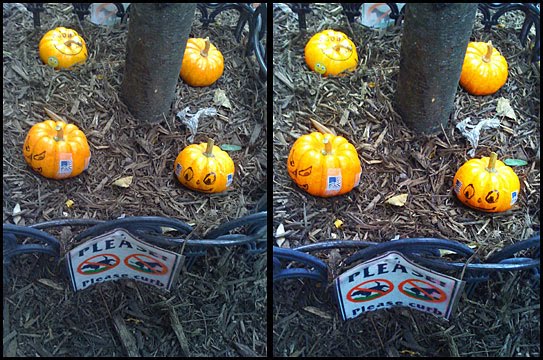
Above: I took a snap of a micro pumpkin patch on 89th Street this evening. It was a great opportunity to test out Adobe's Photoshop for iPhone.
Here's the process: I clicked on the Photoshop icon, and it asked if I wanted to take a photo or use an existing image. I chose the image, then used the crop tool to take out some unneeded detail, turned the saturation slider to plus 10, turned the exposure adjustment up a little, and chose to exit and save. That's it. The photo appeared in my phone's photo library and was ready to post. The original is at left.
It's a very simple app, it's free, and it does the basics. Not bad at all.
Tuesday, October 13, 2009
Sunday In The Park With Joel
Is there any news from the world of photography? Tons of it. Joel Meyerowitz in NYC parks, for one.
Documentary Photographer Turns His Lens on City Parks
Documentary Photographer Turns His Lens on City Parks
In the latest phase of his career, Mr. Meyerowitz, 71, has turned his lens onto nature and wildlife in city parks, in a project evocative of the work of the artists and writers hired by the Works Progress Administration during the New Deal. The city’s Department of Parks and Recreation has commissioned a series of expansive photographs of city green spaces from Mr. Meyerowitz. The resulting works — 90 photographs — are now on view in an exhibition, “Legacy: The Preservation of Wilderness in New York City Parks,” that opened on Friday at the Museum of the City of New York."
Rock Followup: Hair Still Good
News from the world of documentary lawsuits.
Woman Declares Chris Rock's Documentary 'rip-off', Case Dropped
Woman Declares Chris Rock's Documentary 'rip-off', Case Dropped
A judge in Los Angeles District Court dismissed a plagiarism lawsuit against Chris Rock that claimed the comedian lifted a woman's ideas when he filmed a documentary about African-American hairstyles.
Ted's Ideas On Editing Chase Scenes
On Wednesday I'm giving a lecture in one of my classes on editing chase scenes. I've given it a few times before, and it's usually a pretty big hit -- it seems to really help students get a handle on some basic editing concepts.
They may never edit a chase scene, but the bigger point is that they learn to develop a rational plan to make an otherwise complicated and confusing set of shots seem completely coherent, comprehensible, and clear.
We look at clips from about a dozen films, and illustrate the ideas below.
BIG IDEAS OF CHASE EDITING -- AND HOW THEY APPLY TO ALL EDITING
1. IDENTIFICATION
How do we know which character is which? Does one wear a white cowboy hat and the other a black one? Does one have a red car and the other blue? Is the pickup basketball game shirts versus skins?
2. LANDMARKS
If we see the leader pass the big red building, then ten seconds later the other, we know how far apart the characters are. Often, a camera will stay at a landmark position, and pan from one character to another.
3. ADVANTAGE
If a car is chasing a moped, the car has a clear advantage. But when the moped goes into the subway and the car driver follows on foot, now the moped has the advantage.
4. STATUS AND STRENGTH
Is a character gaining or falling behind? A shot where the camera is pulling away, or where the character is catching up to the camera may tell us. A shot with both characters in it might reveal the relative status as well.
5. EMOTIONAL STATE AND ATTENTION
We want to know what the character is thinking, feeling and doing -- so a cut to a shot through the windshield might reveal the character's expression. Or a cut to the foot on the brake might tell us what's happening. Or a closeup on the gear shift. Make careful note of where the character looks -- the next shot might be their "point of view."
6. CAMERA POSITION
A camera can be low in the front of a car, can look out the rear window, can sit in the passenger seat, can look down at the brake pedal -- and all of these shots are useful. It can run alongside the moped as it plunges down the stairs. It can turn to watch the car streak by. It can shake, float, or fly.
7. SCREEN DIRECTION
If a car goes from screen left to screen right, we expect it to keep doing that unless we some change -- a shot where it turns, or where we "move" into the car before coming back out. And we expect the car chasing to also maintain consistent screen direction -- unless we see a change happen.
8. SOUND
If we cut from the big black car to the little red sports car -- should the sound change right on that cut? Or should it change in other ways? Do we want to hear the sound of the car coming toward us, then going away?
9. TAKE A PACING BREATHER
Even in a short chase, all go-go-go action wears thin. It's usually more exciting to have a lot of action, then a tiny pacing "deep breath" before the big finish.
10. CUT TO THE CONSEQUENCES
That tank chasing the laser-guided skateboard just knocked over every fruit stand in aisle 19. Maybe we could cut back to see what happened, and the angry manager shaking her fist at us? Or maybe our wheel can't take much more and is starting to wobble -- maybe a closeup to reveal that?
They may never edit a chase scene, but the bigger point is that they learn to develop a rational plan to make an otherwise complicated and confusing set of shots seem completely coherent, comprehensible, and clear.
We look at clips from about a dozen films, and illustrate the ideas below.
BIG IDEAS OF CHASE EDITING -- AND HOW THEY APPLY TO ALL EDITING
1. IDENTIFICATION
How do we know which character is which? Does one wear a white cowboy hat and the other a black one? Does one have a red car and the other blue? Is the pickup basketball game shirts versus skins?
2. LANDMARKS
If we see the leader pass the big red building, then ten seconds later the other, we know how far apart the characters are. Often, a camera will stay at a landmark position, and pan from one character to another.
3. ADVANTAGE
If a car is chasing a moped, the car has a clear advantage. But when the moped goes into the subway and the car driver follows on foot, now the moped has the advantage.
4. STATUS AND STRENGTH
Is a character gaining or falling behind? A shot where the camera is pulling away, or where the character is catching up to the camera may tell us. A shot with both characters in it might reveal the relative status as well.
5. EMOTIONAL STATE AND ATTENTION
We want to know what the character is thinking, feeling and doing -- so a cut to a shot through the windshield might reveal the character's expression. Or a cut to the foot on the brake might tell us what's happening. Or a closeup on the gear shift. Make careful note of where the character looks -- the next shot might be their "point of view."
6. CAMERA POSITION
A camera can be low in the front of a car, can look out the rear window, can sit in the passenger seat, can look down at the brake pedal -- and all of these shots are useful. It can run alongside the moped as it plunges down the stairs. It can turn to watch the car streak by. It can shake, float, or fly.
7. SCREEN DIRECTION
If a car goes from screen left to screen right, we expect it to keep doing that unless we some change -- a shot where it turns, or where we "move" into the car before coming back out. And we expect the car chasing to also maintain consistent screen direction -- unless we see a change happen.
8. SOUND
If we cut from the big black car to the little red sports car -- should the sound change right on that cut? Or should it change in other ways? Do we want to hear the sound of the car coming toward us, then going away?
9. TAKE A PACING BREATHER
Even in a short chase, all go-go-go action wears thin. It's usually more exciting to have a lot of action, then a tiny pacing "deep breath" before the big finish.
10. CUT TO THE CONSEQUENCES
That tank chasing the laser-guided skateboard just knocked over every fruit stand in aisle 19. Maybe we could cut back to see what happened, and the angry manager shaking her fist at us? Or maybe our wheel can't take much more and is starting to wobble -- maybe a closeup to reveal that?
Touching Retouching
Great article about students in Baltimore who salvage photographs, then use Photoshop to restore them. I think there's something in my eye.
High school students try to save neighbors' memories
High school students try to save neighbors' memories
"The Patapsco photography class was spending part of Monday afternoon examining their first batch of work: photos from the flooded basement of Jane Haines. Haines lives in Logan Village, one of the communities affected last month by a main break that sent water gushing into more than 100 homes in the Dundalk area. Throughout this month, the students are offering to digitally restore photographs ruined in the deluge."
Monday, October 12, 2009
Party Like It's 1993
Is it just me, or is a lot of the current conversation about the future of film distribution very similar to the discussions folks had in the early 90s about the future of the Web?
I have a book about the "future of art" on my shelf, printed just as the World Wide Web came along. Its predictions are completely wrong. I remember all the excitement about media moving to CD-R. That's faded away, though you could certainly do that today easily -- but no one wants to. And I remember many people who were very adamant that they would never read on a computer screen or buy online. Others said they'd never visit a page with advertising.
I streamed a live video conference in 1997, put streaming video online not that long after that, and have made a lot of work for the Web -- so I'm not surprised by the changes that have happened.
What I don't get, the part that is surprising to me, is how flat-footed people in the film production world have been caught by the changes. I think it's being explained in the wrong terms: it's not that you can't make a film, and it's not that you can't distribute a film. Those things are actually easier than ever. The problem is that they no longer make financial sense. The financial system in place works fine at a certain scale, but doesn't work under the new conditions. There's pressure to make Transformers 8 or a YouTube video of your hamster.
The stuff in the middle -- the good stuff -- needs a new model.
I have a book about the "future of art" on my shelf, printed just as the World Wide Web came along. Its predictions are completely wrong. I remember all the excitement about media moving to CD-R. That's faded away, though you could certainly do that today easily -- but no one wants to. And I remember many people who were very adamant that they would never read on a computer screen or buy online. Others said they'd never visit a page with advertising.
I streamed a live video conference in 1997, put streaming video online not that long after that, and have made a lot of work for the Web -- so I'm not surprised by the changes that have happened.
What I don't get, the part that is surprising to me, is how flat-footed people in the film production world have been caught by the changes. I think it's being explained in the wrong terms: it's not that you can't make a film, and it's not that you can't distribute a film. Those things are actually easier than ever. The problem is that they no longer make financial sense. The financial system in place works fine at a certain scale, but doesn't work under the new conditions. There's pressure to make Transformers 8 or a YouTube video of your hamster.
The stuff in the middle -- the good stuff -- needs a new model.
Subscribe to:
Posts (Atom)